Need help? Reach us at 

 +1 (855) 418-2323
Need help? Reach us at
+1 (855) 418-2323

 File Converters TIFF and PDF apps Forensic Freeware
EML is a universal email format supported by Windows Mail, Outlook, eM Client, The Bat!, Mailbird, and dozens of other mail applications. Converting your Thunderbird messages to EML creates portable, self-contained files that you can open in any compatible email client, archive for long-term storage, or share with colleagues who do not use Thunderbird.
Total Thunderbird Converter Pro reads your Thunderbird profile or any MBOX file and exports each message as a separate EML file. Unlike basic export tools and free add-ons, the Pro version preserves all attachments inside the resulting EML files, so nothing is lost during conversion.
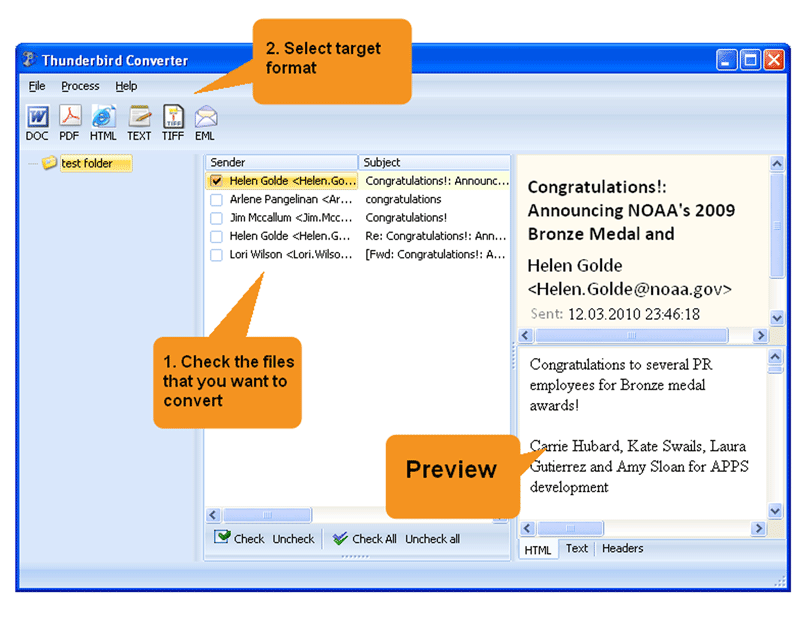
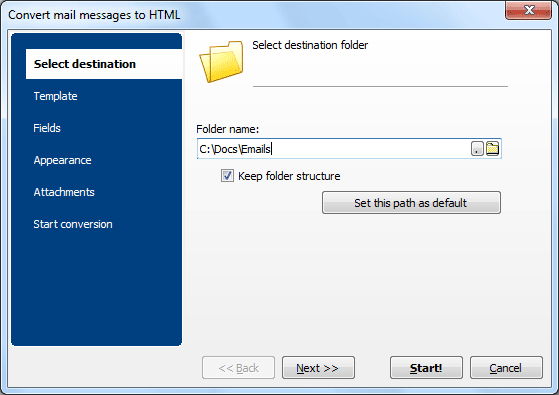
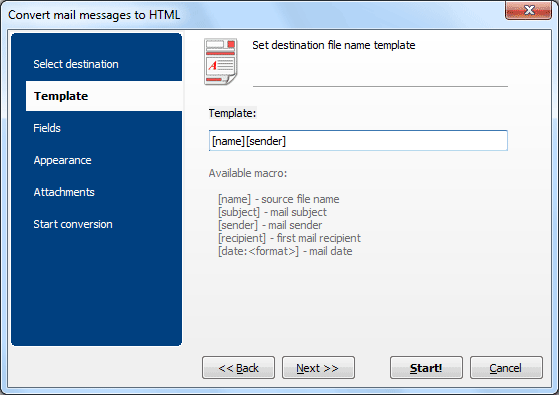
Quick answer: To convert Thunderbird emails to EML, install Total Thunderbird Converter Pro, let it detect your profile, select a folder and use Check All, click the EML icon, set a destination and file-name template, confirm attachments are kept, then press Start. Each message becomes a portable .eml file with attachments intact — batch, offline, no upload.
When conversion finishes, the program opens the output folder so you can verify the results immediately.
Thunderbird does not have a built-in «Export to EML» function. You can drag individual messages from the message list to a desktop folder, which saves them as .eml files. However, this approach is manual: there is no way to select hundreds of emails and export them at once.
The ImportExportTools NG add-on adds bulk export capability, but users report several issues: attachments may be missing or corrupted in the output, large mailboxes cause the add-on to freeze, and there is no control over file naming. If you need reliable batch export with full attachment support, a dedicated converter is the safer choice.
 Migration to another mail client. If you are switching from Thunderbird to Windows Mail, eM Client, The Bat!, or Mailbird, EML is the format they all understand. Each message becomes a standalone file that can be imported in bulk.
Email archiving. EML files are compact, human-readable, and easy to index. Store them on a NAS, cloud drive, or backup medium. Unlike MBOX, individual EML files let you find and retrieve a specific message without opening the entire mailbox.
Legal and compliance needs. Individual EML files make it simple to produce specific messages for audits, legal discovery, or GDPR data requests. Each file is a complete, unaltered copy of the original email.
Batch processing. Total Thunderbird Converter Pro handles any volume — from a handful of messages to an entire mailbox with tens of thousands of emails. Conversion speed does not depend on the number of messages.
Thunderbird stores all messages from a single folder in one MBOX file. This is efficient for the email client, but inconvenient for backup, migration, or sharing. If the MBOX file gets corrupted, you may lose every message in that folder.
EML splits the mailbox into individual files. Each .eml file contains one message with its headers, body, inline images, and attachments. This makes EML more portable, more resilient, and easier to work with outside of an email client. You can search EML files with Windows Explorer, attach them to support tickets, or import them into a different mail application one by one or in batch.
The converter also supports MBOX files from Apple Mail, Eudora, SeaMonkey, Postbox, and other clients. Simply use Open Mailbox to point the program at any MBOX file on disk and convert it to EML.

Download free trial and convert your files in minutes.
No credit card or email required.

Related Topics
