Logo
Home Products Support Contact About Us
arrow1 File Converters
arrow1 TIFF and PDF apps
arrow1 Forensic
arrow1 Freeware

Export Thunderbird Emails to Text (TXT) with Attachments


Plain text is the most compact and universal format for email archiving. Every operating system can open TXT files without extra software. Total Thunderbird Converter Pro makes it easy to export Thunderbird emails to TXT while processing attachments automatically.

How to Convert Thunderbird to TXT

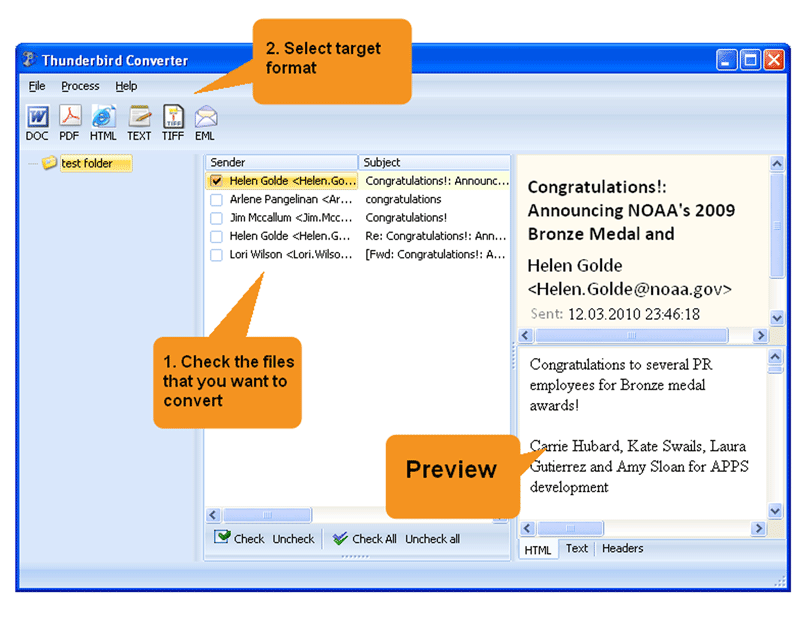
  • Launch the program. It reads your Thunderbird profile and lists all mail folders.
  • Browse to the right folder and select the emails to convert (or press Check All).
  • Click the TXT icon in the toolbar.
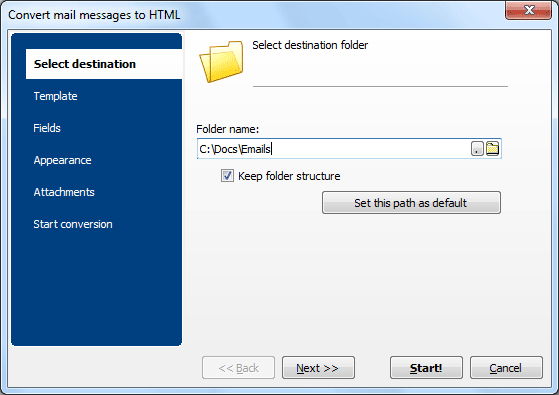
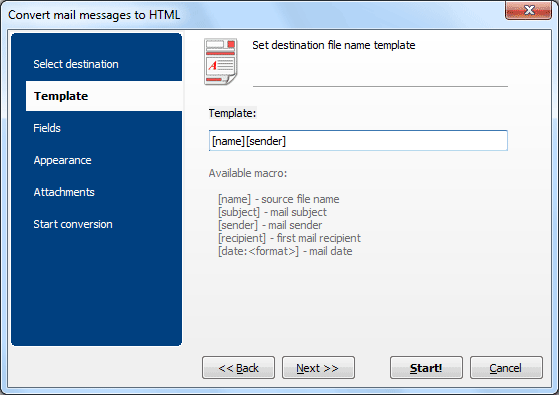
  • Set the output folder and file-name template (date, subject, sender, etc.).
  • Choose which fields to export: sender, recipient, date, subject, body, headers, CC, BCC.
  • Configure attachment handling in the Attachments tab. Text from attached documents is extracted and saved alongside the email.
  • Press Start.

Each email produces a separate TXT file. Attached images are saved to a subfolder since TXT cannot embed graphics.

When TXT Is the Right Choice

Green PlusFull-text search. TXT files are instantly searchable by Windows, macOS, and Linux built-in search tools. No special indexer required.

Green PlusMinimal storage. Plain text takes far less disk space than PDF or DOC. Ideal for large mailboxes with tens of thousands of messages.

Green PlusData extraction. When you need just the raw content — sender, date, subject, body — without formatting, TXT is the cleanest option.

Green PlusSelective field export. Include only the fields that matter: drop headers you do not need, keep the body and metadata, or export addresses only for a mailing list.

Green PlusUTC date normalization. If your emails arrive from multiple time zones, the converter can unify all dates to UTC for a neat chronological order.

download thunderbird email converter

Windows 7/8/10/11 • 30-day free trial


quote

Total Thunderbird Converter Pro Customer Reviews 2026

Rate It
Rated 4.8/5 based on customer reviews
5 Star

"We extract plain text from journalist email archives for our NLP research. The Pro converter processes emails and text-based attachments together. Clean UTF-8 output works directly with our Python text analysis pipeline."

5 Star Andrew Black Data Scientist, BBC Research

"Regulatory requirement to maintain searchable text copies of all business correspondence. The Pro converter extracts text from emails and attached documents in batch. Command-line automation runs weekly on our archive server."

5 Star Elena Vasquez Records Manager, Telefonica Spain

"Engineering email threads with specification attachments need text versions for our search index. The converter extracts text from both emails and documents. Batch mode processes our monthly email archive efficiently."

4.5 Star Kenji Yoshida Systems Engineer, Honda R&D

FAQ: Exporting Thunderbird Email Text with Attachments ▼

Text export with attachments (Pro feature) extracts plain text from both the email body and text-based attachments. Regular TXT conversion only processes the email message itself.
DOC, DOCX, HTML, PDF, RTF, and other text-based formats are extracted as plain text. Binary files (images, archives) are saved separately.
Yes. Batch mode processes entire folders. Each email and its text-extractable attachments become a separate TXT file.
Yes. Plain text output is fully searchable by any text editor, grep, or full-text search tool. Ideal for building searchable email archives.
Yes. Select sender, recipient, date, subject, body, CC, BCC fields individually.
Yes. Automate text extraction with the command-line interface for recurring batch jobs.


Start working now!

Download free trial and convert your files in minutes.
No credit card or email required.

⬇ Download Free Trial Windows 7/8/10/11 • 93 MB

Support
Total Thunderbird Converter Pro Preview1
Total Thunderbird Converter Pro Preview2
Total Thunderbird Converter Pro Preview3

Latest News

Newsletter Subscribe

No worries, we don't spam.


© 2026. All rights reserved. CoolUtils File Converters

Cards