How To Convert PST to PDF
Convert PST emails to PDF with Total Outlook Converter for Windows. Open a saved PST file or use one of the source options below, then select the messages you want to export. Save a PDF for each email or combine the messages into one document, with control over the included fields and attachment handling. Download the free trial to prepare PDF copies for reading, sharing or archiving.
Many users need to turn their emails into these files at least occasionally. After all, it is one of the most common document formats that may be opened on many platforms. There is more than one way to approach PST to PDF transition. This article will show you the most efficient methods to get the job done. Convert PST to PDF without hassle — it is not rocket science.

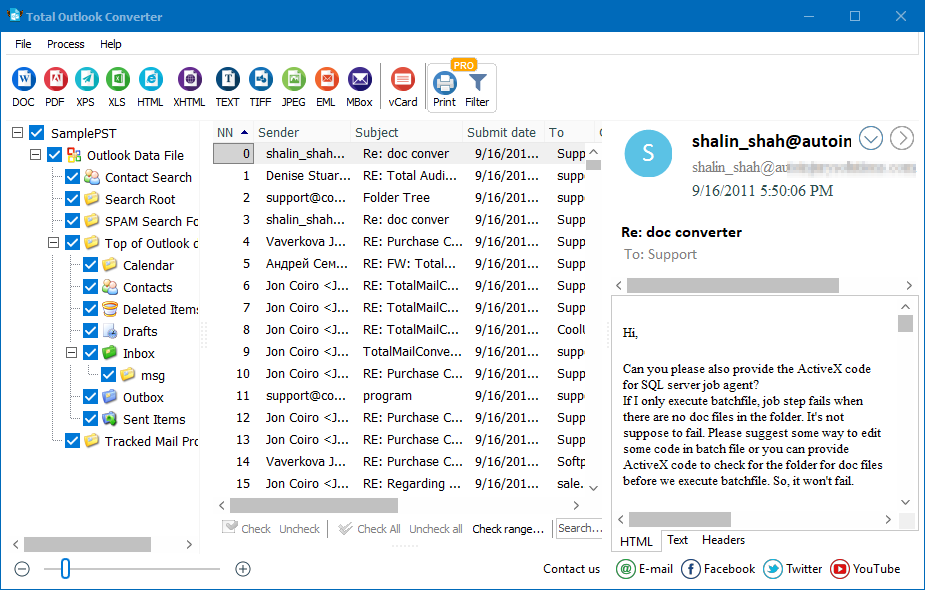
Quick answer: To convert PST to PDF, run Total Outlook Converter, let it detect or open the Outlook PST or OST file, choose the folder such as Inbox, tick the messages you want, then click the PDF button on the ribbon. Hundreds of emails are converted in one batch offline, merged into one document or saved separately, with optional password protection and Bates numbering.
Why Convert PST to PDF?
First, PDF is a very convenient format. It has a number of obvious advantages. Specifically, users prefer to store emails as PDF files because:
- they are easy to store and access;
- they may be encrypted and protected with a password;
- they are easier to move than Outlook PST files that are not portable by nature;
- users who do not have Outlook on their devices can still view them;
- conversion is a convenient way to save emails before retiring or prepare evidence for a legal investigation.
This does not mean Outlook PST has no benefits. First, it allows you to keep all of your correspondence in one place. You can access it whenever necessary.
On the downside, this format is platform-dependent: it is only recognized by the program that created it — i.e., Outlook. Conversion makes data easier to manage. Unfortunately, while other MS Office apps allow you to generate PDFs automatically, the mail client does not.
Manual methods exist, but they are extremely time-consuming and laborious. If you have only a little data to convert, try our free convert PST to PDF online service. Just upload the source file to the site, choose your output preferences, and download the result upon completion. This method works for modest amounts of data, but what if you have hundreds of emails, and all of them are valuable?
Things get tricky when there is a large volume to convert. In addition to the time required (users need to take multiple steps to convert PST to PDF each time), accuracy may also be affected. Why risk losing valuable information? The wisest approach is to use a tailor-made utility designed especially for PST to PDF transformation.
![PST to PDF conversion options]()
Why Automated Approach Is the Best
If the system could save emails as a PDF document flawlessly, there would be no demand for PST to PDF converter tools. Professional utilities like the Outlook Converter deliver quick and efficient results. These tools were devised specially for the task, and they offer the most reliable way to transform emails. Not only do they save your time — conversion is done with just one click. Even hundreds of messages are transformed in a flash, and the flexibility of the settings is impressive!
Just let the program detect the original Outlook PST file and launch the PST to PDF process. One piece of software is all it takes to convert all of your emails into the desired format. Total Outlook Converter works with all popular versions of Outlook and Windows: from XP to Windows 10. It is also very affordable and can be used an unlimited number of times. This means the more you turn PST to PDF— the cheaper every new conversion is!
Key Benefits of PST to PDF Converter
The system offers convenience, speed, and flexibility. No alternative methods can offer comparable advantages. Users of Total Outlook Converter for PST to PDF transformation enjoy multiple benefits. They can:
- process big files with the *.pst or *.ost extension quickly and accurately;
- choose between different PDF document types (plain, non-searchable, or PDF/A for archiving);
- combine PST into one PDF document;
- auto-apply bates numbers;
- rename the resulting files;
- change page size, orientation, and fit-to-page settings;
- make the contents secure (e.g., safeguard it with a password or define permissions for different users);
- include their virtual signature in the documents;
- add pagination in the PDFs the program generates;
- include information about related attachments into all output PDFs;
- launch PST to PDF conversion via the command line when necessary.
Did you know that attachments can be transformed just as easily? The advanced Pro version of the tool can handle a broad spectrum of source formats: BMP, DOC, HTML, JPEG, PNG, PPT, RTF, TIFF, TXT, XHTML, XLS. All of them are turned into PDFs quickly.
There is also a server version with ActiveX.
Three Source Options
You can choose the way in which you want your emails fetched for conversion from PST to PDF. This depends on where your PST file is located, and whether this location is known to you. Total Outlook Converter for PST to PDF offers these options:
- It can obtain emails by connecting to your Outlook account and convert PST to PDF files (the originals will remain in the system).
- It can convert PST or OST files stored on your hard drive.
- It can launch an automatic search for the files on your machine.
How to export PST emails to PDF
- Open your source. Launch Total Outlook Converter and open the PST file, or choose one of the source options above.
- Select the messages. Open the folder you need and select individual emails or the whole folder for conversion.
- Choose PDF. Click PDF on the ribbon to open the conversion wizard.
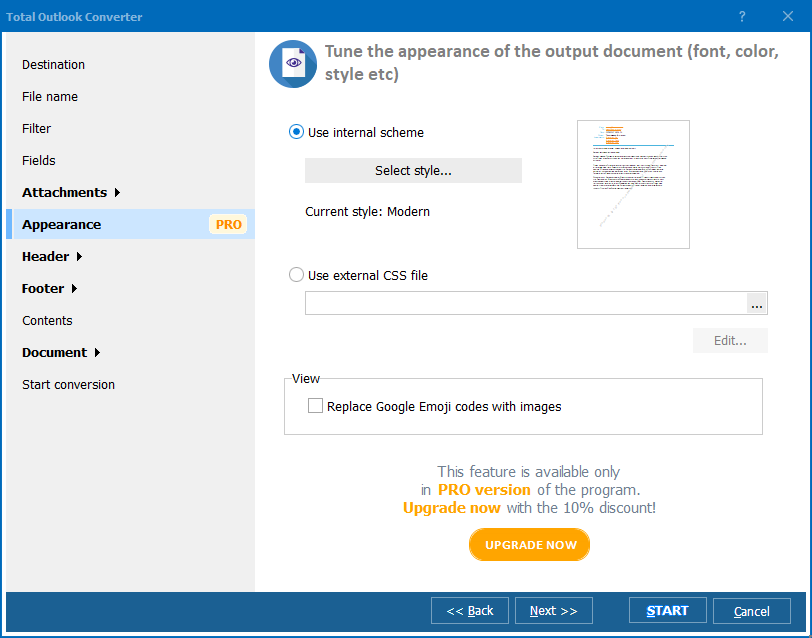
- Set up the output. In Destination, choose the output folder and separate PDFs or one combined document. Review File Name and Fields, then adjust Appearance, Header and Footer if needed.
- Start the conversion. Review your choices and click Start. The PDF files are saved to the destination you selected.
Choose the edition for your attachments
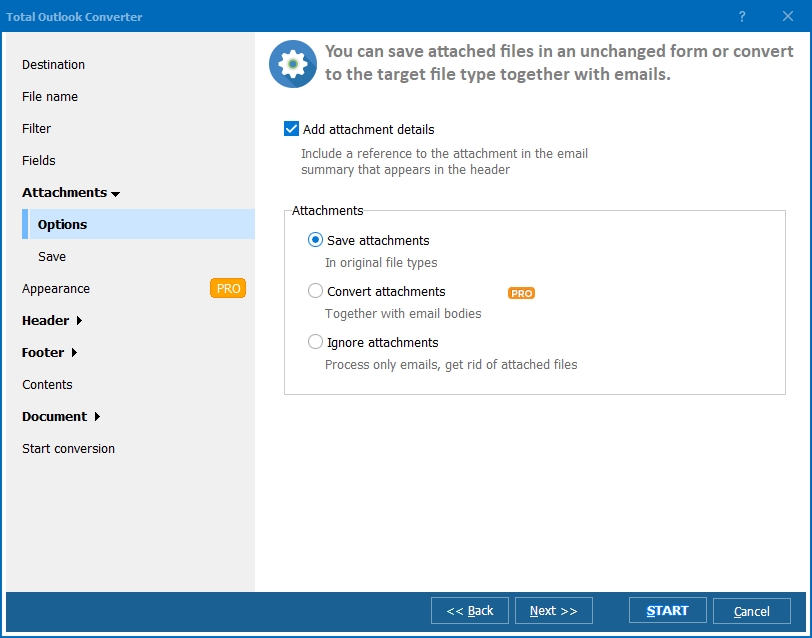
Total Outlook Converter can keep original attachments as separate files and insert attached images into the output. Choose Total Outlook Converter Pro when supported document attachments also need to become PDF pages with the email body. The attachment guide below explains the available output options.
Before exporting the full archive, compare one PDF per email with a combined PDF and choose an arrangement that suits the recipient.
Convert Attachments with Ease
During the conversion from PST to PDF, attachments may be saved in several ways. The system may unpack zipped attachments, or save them as separate folders. It may include attached images into the documents and fit them to the page. Attached messages and documents may also be saved as separate files if necessary. The system has an intuitive interface that helps you convert PST in the most convenient way.
Learn
how to convert with attachments from PST to PDF on our site — there are many more tricks to try! Everything is done automatically and with guaranteed accuracy. You do not need to be well-versed in IT jargon to use it. Even beginners can cope with the transformation of PST to PDF by means of this PST to PDF converter.
![PST file converted to PDF]()
All-in-One
The Total Outlook Converter is the ultimate solution for PST to PDF conversion. It provides a smooth and speedy transformation of emails and attachments, with guaranteed precision. You can convert PST in a quick and hassle-free way!
Whether you need to back up data or prepare for litigation, this lightweight tool will create flawless PDFs. Customizable and affordable, it comes with a wide range of licenses: for personal and business use, plus server and developer options. Download a free
trial version today and allow it to convert PST with ease! You can always
contact us for more information.
PST to PDF — FAQ
How do I convert PST to PDF?
▼
Run Total Outlook Converter, let it detect or open your Outlook PST or OST file, choose the folder such as Inbox, tick the messages, then click the PDF button on the ribbon. Hundreds of emails are converted in one batch.
Can I convert PST to PDF in batch?
▼
Yes. Total Outlook Converter processes large PST and OST files quickly. Select a whole folder or mailbox, click the PDF button, and every message is converted in a single run, either merged into one PDF or saved separately.
Is converting PST to PDF free?
▼
Total Outlook Converter offers a free trial you can use to convert PST to PDF and test every feature. After the trial, the tool is affordable with personal, business, server, and developer licenses.
Does PST to PDF conversion keep attachments?
▼
Yes. During conversion attachments can be unpacked from zip, saved as separate folders, or embedded as images fitted to the page. Attached messages and documents can also be saved as separate files.
What types of PDF can it create?
▼
Total Outlook Converter can produce plain, non-searchable, or PDF/A files for archiving. You can also auto-apply Bates numbers, add pagination, set a password, define permissions, and include a digital signature.
How do I convert PST to PDF without Outlook?
▼
Total Outlook Converter can convert PST or OST files stored on your hard drive or launch an automatic search for them, so Microsoft Outlook does not need to be installed to do the conversion.
Can I convert PST to PDF from the command line?
▼
Yes. Total Outlook Converter can launch PST to PDF conversion via the command line, and a server version with ActiveX is available for integration into automated workflows.


 +1 (855) 418-2323

 File Converters