

 +1 (855) 418-2323

 File Converters
Enhanced Metafile (EMF) is a 32-bit
vector graphics format developed by Microsoft for the Windows
operating system. EMF files store images as sequences of drawing
commands, not as pixel grids. The format records geometric shapes, text,
and bitmap data in device-independent structures.
EMF arrived in 1993
with Windows NT 3.1 as a successor to the 16-bit Windows
Metafile (WMF). What is EMF in practical terms? A container for scalable
vector graphics inside Microsoft Office and the Windows print
system.
Key points of the article:
-
Enhanced Metafile (EMF) is a 32-bit
vector graphics format released in 1993 -
EMF files store drawing commands instead of pixel data
-
Microsoft Office (Word, PowerPoint, Excel) supports EMF
natively -
The format replaced the older 16-bit WMF with improved color
depth -
Cross-platform use requires conversion to SVG or PDF
The history and
evolution of EMF files
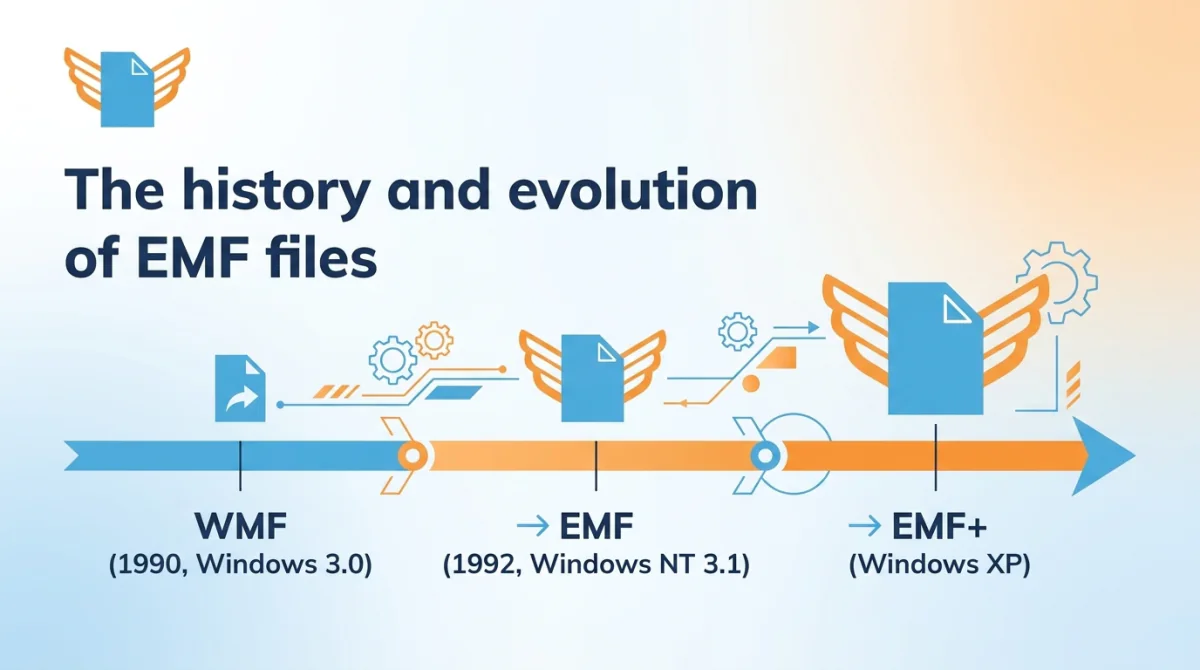
EMF launched
in 1993 alongside Windows NT 3.1. The Enhanced Metafile format
replaced the Windows
Metafile (WMF), a 16-bit standard present since Windows 2.0 in
the late 1980s. Microsoft created the new format because WMF could not
meet the graphics demands of 32-bit Windows.
WMF lacked
device independence, and its 16-bit architecture restricted
color depth. Developers embedded custom headers into WMF, which caused
compatibility
issues. EMF solved all three problems through the Win32 API. The
32-bit structure added full RGB color support and a standardized header,
so designers could move files between printers and screens without
reformatting.
Technical
characteristics of EMF files
EMF is a 32-bit binary format that stores vector graphics as
device-independent records. Each entry maps to a Windows Graphics Device
Interface (GDI)
function call. The operating system executes these instructions to
render the image on any output device.
| Attribute | EMF | WMF (predecessor) |
|---|---|---|
| Bit depth | 32-bit | 16-bit |
| Device independence | Full | Limited |
| Color support | Full RGB color | Restricted palette |
| File extension | .emf | .wmf |
| First release | 1993, Windows NT 3.1 | Late 1980s, Windows 2.0 |
| MIME type | image/emf | image/wmf |
An EMF file contains a
header record, a sequence of drawing records (including object
definitions), and an end-of-file record. The opening section
stores reference device dimensions in pixels and millimeters, which
applications use to calculate DPI.
Common uses for EMF files
EMF files serve professionals who need scalable vector graphics
inside the Windows environment. Microsoft Office and the print spooler
both rely on the EMF format.
-
Clipart and illustrations inside PowerPoint
presentations -
Cached vector graphics in the Windows print spooler
-
Scalable diagrams in Word and Excel documents
-
Technical documentation graphics for engineering teams
-
Template-based visual elements for corporate branding
EMF in printing and
publishing
EMF stores a cached graphic in the Windows print spooler. The system
converts
output to EMF records before passing data to the printer driver.
That caching reduces memory load on the device. EMF supports device
independence, so a logo at 96 DPI scales to 1,200 DPI without
resampling. One enterprise print shop reported running 20,000 EMF-based
templates through a single queue with no formatting errors.
EMF in cross-platform
display
EMF guarantees visual consistency across Windows devices with
different screen resolutions. An Excel chart in EMF format on a 1080p
monitor looks identical on a 4K display. The vector graphics commands
recalculate at the target resolution automatically. Device independence
inside the Windows ecosystem means EMF adapts to DPI settings without
manual adjustment. macOS and Linux do not support EMF natively, so
sharing with non-Windows users requires conversion to PDF, SVG, or
PNG.
EMF in Microsoft Office
applications
Microsoft Word, Excel, and PowerPoint support EMF natively. Users
insert an EMF file through Insert > Picture, then ungroup the graphic
to access individual shapes. ClipArt in EMF format is editable through a
three-step Ungroup workflow: right-click the object, select Ungroup, and
confirm. A marketing team used this process to recolor 40 standard
clipart illustrations to match a corporate palette in one afternoon.
Advantages of the EMF format
What is EMF’s edge over raster formats? The Enhanced Metafile stores
vector graphics commands, not pixels. That architecture produces five
measurable benefits:
-
Lossless scalability. Vector graphics commands
reproduce images at any size without pixelation -
Small file size. EMF stores mathematical
instructions, not pixel data, so diagrams require far less storage than
equivalent raster files -
Device independence. The 32-bit
structure ensures identical rendering on screens, printers, and
plotters -
Editability. Users ungroup EMF objects in
PowerPoint to modify shapes and colors at the element level -
Metadata preservation. EMF retains DPI, color
space, and drawing order data across saves
EMF’s scalability and device independence make the format a strong
choice inside Microsoft Office. One design team resized a single EMF
diagram from a business card to an A0 poster with zero quality
degradation.
Limitations of EMF files
EMF carries platform restrictions because Microsoft maintains the
specification for the Windows operating system only. Cross-platform
teams face four specific issues:
-
Windows-centric. macOS and Linux lack native EMF
rendering. Adobe Illustrator or LibreOffice Draw provide workarounds on
those platforms -
No web browser support. EMF requires conversion
to PNG or SVG before online publishing -
Binary structure. Text editors cannot open or
inspect EMF files, unlike XML-based SVG -
Limited cross-OS sharing. EMF requires
conversion to SVG or PDF for collaboration outside Windows
The practical workaround for all four issues is file conversion.
Convert EMF to SVG for web and cross-platform editing, or to PDF for
document distribution.
How to open EMF files
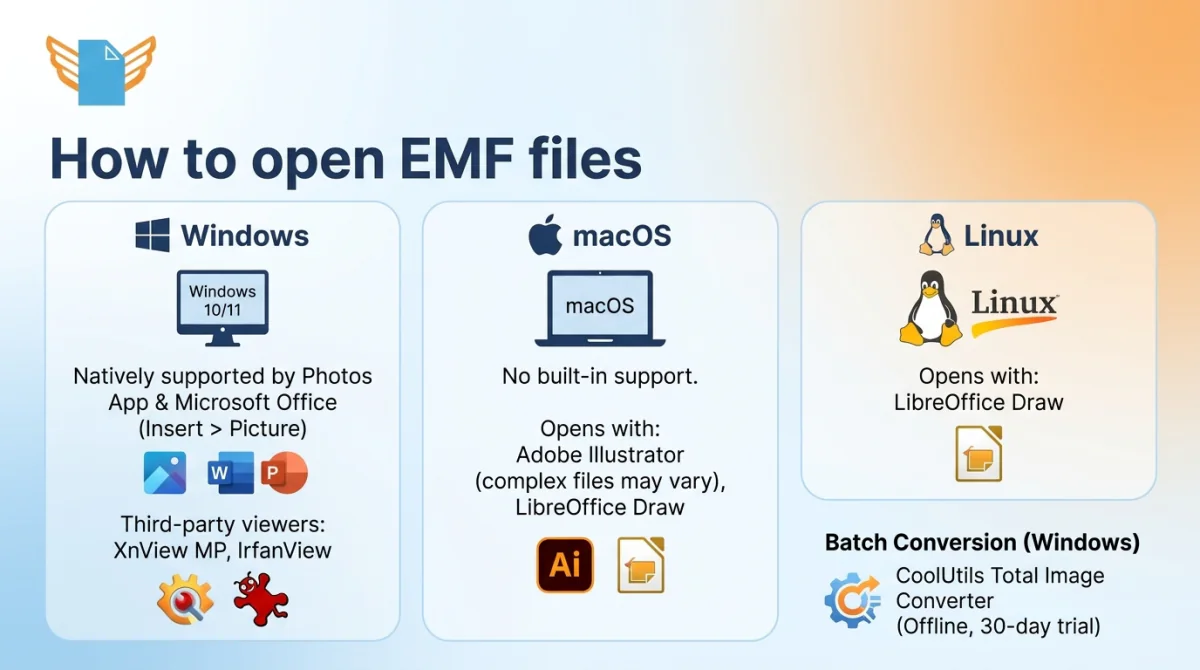
Windows and Microsoft Office recognize EMF as a native image format.
Non-Windows systems need a third-party viewer or file conversion. The
basic opening process follows four steps:
-
Locate the .emf file on your device
-
Right-click the file icon
-
Select “Open with” from the context menu
-
Choose a compatible application from the list
Opening EMF files on Windows
The default Photos app on Windows
10 and 11 does not support EMF. XnView MP and IrfanView open .emf files
on any Windows version. Microsoft Office works too: insert EMF into Word
or PowerPoint through Insert > Picture.
Opening
EMF files on Mac and other operating systems
macOS lacks built-in EMF support. Adobe Illustrator opens EMF on Mac,
though complex GDI records or EMF+ extensions may not render correctly.
LibreOffice
Draw handles EMF on macOS and Linux. XnView MP provides an
additional viewer option on Linux.
For batch file conversion on a Windows PC, CoolUtils Total Image
Converter processes EMF files offline. Download the 30-day trial
and test on your actual files, with no card required.
Creating and editing EMF
files
Microsoft Office, Adobe Illustrator, CorelDRAW, and Inkscape (free) all create or
export EMF vector graphics. The creation workflow follows three
steps:
-
Create or select the graphic in the source application
-
Export or save the file in .emf format
-
Verify the output opens correctly in the target program
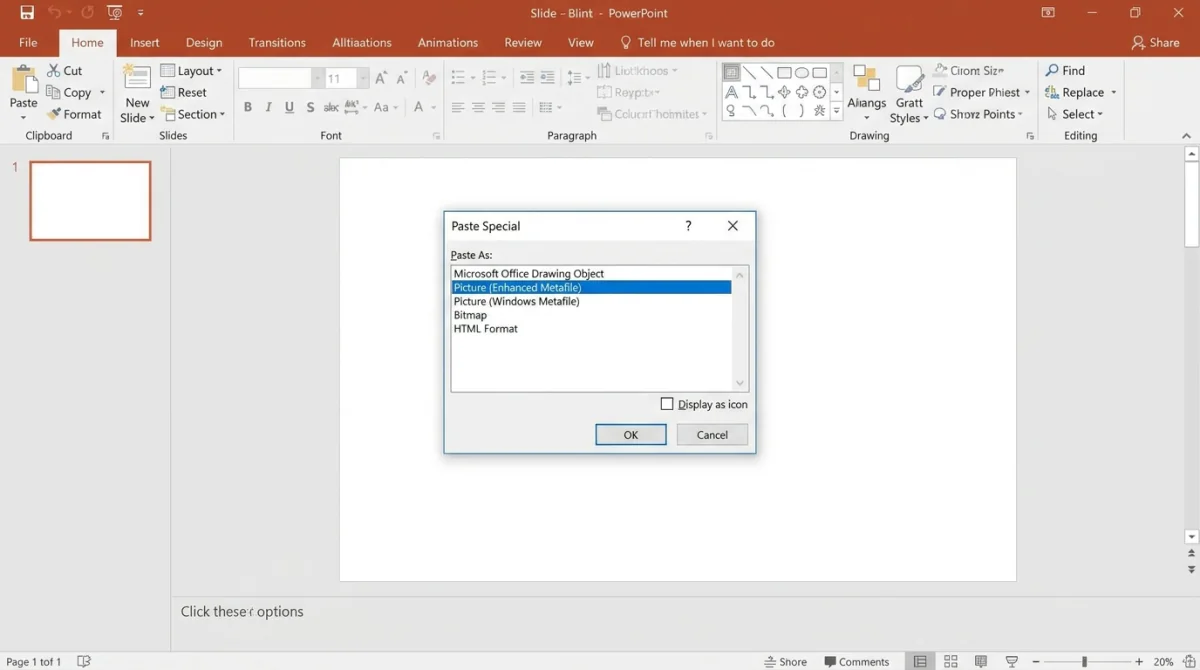
Creating EMF files in
Microsoft Office
PowerPoint offers a three-step EMF creation method. Select objects on
a slide, copy the selection, then use Edit > Paste Special >
Picture (Enhanced Metafile). Word and Excel offer the same menu option
for EMF creation. For best results, design the original graphic at high
resolution before the conversion step.
Customizing and editing
EMF graphics
Right-click an EMF graphic in PowerPoint, select Group > Ungroup,
and confirm. The application breaks the vector graphics metafile into
individual shapes, text, and lines. ClipArt in EMF format benefits from
this capability because each element becomes independently editable.
-
Recolor individual shapes to match brand
palettes -
Resize specific vector graphics components
independently -
Delete unwanted elements from the original
clipart -
Combine EMF elements with native PowerPoint
shapes
Converting
between EMF and other file formats
File conversion from EMF to a raster format (PNG, JPEG) produces a
fixed-pixel image. SVG and PDF output preserves vector structure after
the conversion.
| Conversion | Output type | Quality impact |
|---|---|---|
| EMF to PNG | Raster | Fixed resolution; set dimensions before export |
| EMF to JPEG | Raster | Lossy compression applies |
| EMF to SVG | Vector | Preserves scalability; ideal for web |
| EMF to PDF | Vector | Preserves layout; universal viewing |
| WMF to EMF | Vector | Upgrades 16-bit to 32-bit |
EMF converts to all formats above through CoolUtils Total Image
Converter in batch on Windows. A command-line interface (CLI)
enables automated conversion.
EMF vs. other common file
formats
EMF vector graphics compete with PNG, SVG, and PDF across different
platforms and use cases. Each format targets a specific workflow. The
comparison table below summarizes the four formats at a glance.
| Attribute | EMF | PNG | SVG | |
|---|---|---|---|---|
| Format type | Vector | Raster | Vector | Vector |
| Platform | Windows | Cross-platform | Cross-platform | Cross-platform |
| Web display | No | Yes | Yes | Yes (with viewer) |
| Office native | Yes | Insert only | Limited | Insert only |
| Best use case | Office graphics, printing | Screenshots, photos | Web, responsive design | Document distribution |
EMF vs. raster formats (PNG,
JPEG)
EMF stores vector graphics commands that scale without artifacts. By
contrast, PNG and JPEG rely on
rectangular pixel arrays that degrade when enlarged. An EMF logo
prints on a business card and a poster without quality loss. The same
graphic at 300 x 300 pixels blurs when scaled to large dimensions.
Choose EMF for diagrams, logos, and technical illustrations. Choose PNG
for screenshots and photographs at fixed resolution.
EMF vs. other vector
formats (SVG, PDF)
All three vector formats serve different environments. EMF integrates
with Microsoft Office and Windows
GDI for screen and print output. SVG uses XML markup
and works in every modern browser on every operating system. PDF
preserves page layout and renders identically on Windows, macOS, Linux,
and mobile devices. One agency chose SVG for a multi-platform campaign
after testing EMF and finding that Mac recipients could not view the
files natively.
Windows-only Office workflow? ? EMF. Web or cross-platform display? ?
SVG. Universal document sharing? ? PDF.
Frequently asked questions
What is EMF in simple terms? EMF (Enhanced Metafile)
is a Windows vector graphics format that stores images as drawing
commands. Microsoft released EMF in 1993 as a 32-bit upgrade to WMF.
What is an EMF file used for? EMF files store
scalable vector graphics for Microsoft Office documents, print spooling,
and technical illustrations. PowerPoint and Word use EMF for clipart
that users can ungroup and recolor.
Is an EMF a vector file? Yes. EMF is a 32-bit vector
graphics format that records shapes and text as mathematical
descriptions. The format scales to any resolution without
pixelation.
How do I open EMF files on a Mac? macOS lacks native
EMF support. Adobe Illustrator and LibreOffice Draw open EMF on Mac. On
a Windows PC, CoolUtils Total Image
Converter converts EMF to PDF or SVG in batch.
What programs can open EMF files? Nine applications
open EMF natively or via import: Microsoft Word, PowerPoint, Excel,
Adobe Illustrator, CorelDRAW, LibreOffice Draw, XnView MP, IrfanView,
and Inkscape.
How to convert EMF file to JPG? CoolUtils Total
Image Converter converts EMF to JPG in batch with CLI support on
Windows. Set target resolution (e.g., 300 DPI for print) before
export.
What are the benefits of using EMF format for clipart in
PowerPoint? PowerPoint users ungroup EMF clipart into
individual vector shapes in three clicks (right-click, Ungroup,
confirm). That enables custom recoloring, resizing, and editing without
quality loss.
How do I convert WMF to EMF? CoolUtils Total Image
Converter upgrades WMF to EMF in batch on Windows. The process
transforms 16-bit data to 32-bit Enhanced Metafile records.
Can Photoshop open EMF files? No. Photoshop does not
support EMF import. The application returns a parsing error when users
attempt to open .emf files. For vector editing of EMF content, use Adobe
Illustrator. To edit EMF in Photoshop, first convert the file to PNG or
TIFF.
Is the EMF file format still relevant today? EMF
remains relevant inside Windows and Microsoft Office for print spooling
and clipart since 1993. For web projects, SVG and PDF have replaced
EMF.
Need to convert or batch-process EMF files? Download the Total Image
Converter free trial. Test on your files for 30 days, with no
card required.
Convert EMF files online
Free, no installation, no upload limits — convert right in your browser:

