

 +1 (855) 418-2323

 File Converters
GIF (Graphics Interchange Format) is a raster image format that
supports both static images and frame-based animation within a single
file container. CompuServe released the format in 1987. GIF is one of
the oldest image standards still in active use today. Steve Wilhite, the
format’s inventor, received a Webby Lifetime Achievement Award in 2013
in recognition of GIF’s cultural and technical impact.
Core facts about the GIF format:
-
GIF stores image data using an 8-bit indexed color palette,
capping color count at 256 per frame. -
GIF applies LZW (Lempel-Ziv-Welch) compression, which reduces
file size without discarding any pixel data. -
GIF supports looping animation through sequential frames, each
with its own timing setting in hundredths of a second. -
GIF allows single-color binary transparency, so the format suits
web graphics placed on any background color. -
GIF files carry the .gif file extension across all major
operating systems and browsers.
Understanding what GIF files
are
GIF is a raster image file format that stores color using an indexed
palette, supports frame-based animation, and applies lossless LZW
compression to reduce file size. CompuServe designed the format for
efficient transmission over slow dial-up connections, so compact file
size was a primary engineering goal from the start. GIF remains one of
the most universally supported image formats across web browsers,
operating systems, email clients, and messaging platforms.
Before GIF existed, images were encoded in proprietary formats tied
to specific hardware. CompuServe solved that fragmentation by defining a
platform-independent structure that any software could read and render
correctly. The .gif extension identifies GIF files across Windows,
macOS, Linux, iOS, and Android without any additional codec or plugin
installation.
GIF supports a maximum canvas size of 65,535 ? 65,535 pixels, which
covers all practical display dimensions. The format handles both
single-frame static images and multi-frame animated sequences within the
same file structure. Both image types share the same compression model
and color palette constraints.
The history and
evolution of GIF files
CompuServe released the first GIF specification in June 1987. The
1987 version, named GIF87a, provided a color image standard that worked
across different computer systems and replaced a fragmented landscape of
platform-specific formats. GIF87a supported static images and
transparency but did not include animation capability.
CompuServe extended the specification in 1989. The updated version
was named GIF89a. The GIF89a version added frame-based animation,
per-frame timing control, loop count settings, and improved transparency
handling. Web browsers adopted GIF89a widely during the early 1990s, and
the format became the dominant choice for web graphics throughout that
decade.
LZW compression, which GIF uses internally, became a source of legal
controversy in the mid-1990s. Unisys Corporation held a patent on the
LZW algorithm and began enforcing licensing fees for software that
created GIF files. The dispute drove development of the PNG format in
1996 as an open, patent-free alternative. The LZW patents expired in
2003 and 2004. The expiration removed the licensing restriction and
restored unrestricted GIF development worldwide.
Social media platforms accelerated GIF adoption in the 2010s. Tumblr
introduced native GIF support in 2007. Twitter added GIF upload
capability in 2014. Giphy launched in 2013 and grew into the largest GIF
library on the internet. The platform hosts billions of animated files.
Google acquired Tenor, a competing GIF platform, in 2018.
The pronunciation debate
Steve Wilhite, the GIF format’s inventor, stated at the 2013 Webby
Awards that GIF is pronounced “JIF,” with a soft G sound matching the
peanut butter brand. Wilhite maintained that position consistently and
is the authoritative source on the creator’s original intent.
The majority of English speakers use a hard G and pronounce the
format as “GIF” to rhyme with “gift.” Major dictionaries, including
Merriam-Webster and the Oxford English Dictionary, list both
pronunciations as acceptable standard usage. The debate has generated
more online commentary than any other file format naming dispute, which
reflects GIF’s broad cultural presence.
Technical
characteristics of GIF files
GIF is an 8-bit image format that stores color through an indexed
palette of up to 256 entries per frame. LZW (Lempel-Ziv-Welch)
compression reduces file size without any loss of image data. Every
pixel’s original indexed color value is preserved in the output file.
Animation support works by storing sequential image frames as
independent blocks within the same file. Each frame carries a display
delay value that controls its on-screen duration.
GIF’s lossless compression suits images with flat color areas, sharp
edges, and limited color ranges. Photographs and gradient fills compress
poorly because the 256-color palette forces the encoder to reduce color
information and introduce visible banding. Line art, icons, logos, pixel
art, and interface elements reproduce with full accuracy under GIF’s
compression model.
GIF file structure and
format
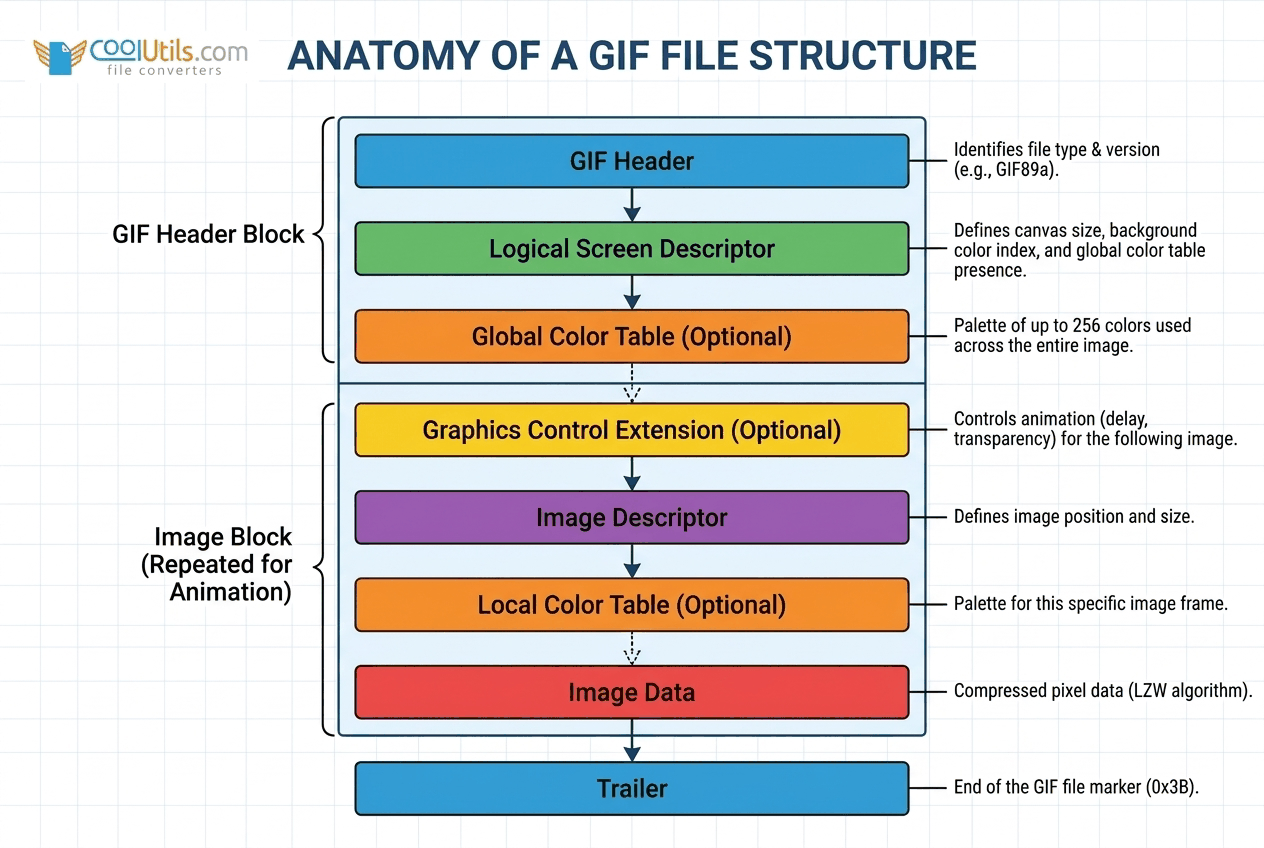
A GIF file contains six structural components: a header block, a
logical screen descriptor, a global color table, image descriptors,
image data blocks, and a trailer byte. The header block stores the
three-character signature “GIF” followed by the version string “87a” or
“89a.” The logical screen descriptor defines canvas dimensions and the
background color index.
CompuServe released GIF87a in June 1987 and GIF89a in July 1989. The
GIF89a specification added four extension block types: the graphic
control extension (controls frame timing and transparency index), the
comment extension, the plain text extension, and the application
extension. The application extension enables looping animation via the
Netscape Application Block, which most GIF encoders write to set the
loop count to infinite.
GIF file characteristics:
-
8-bit format with an indexed color palette of up to 256 entries
per frame -
Binary transparency: one color index designated as transparent,
with no partial transparency support -
Frame-based animation with per-frame delay values expressed in
hundredths of a second -
LZW compression applied to pixel rows for lossless file size
reduction -
Maximum canvas dimension of 65,535 ? 65,535 pixels per the GIF89a
specification
Color limitations and
compression
GIF restricts each frame to a maximum of 256 colors drawn from the
full 24-bit RGB color space. The encoder selects the 256 values that
best represent the source image and discards the rest. For images that
contain fewer than 256 distinct colors, such as icons and line art, the
palette limit produces no visible quality loss.
| Format | Colors supported | Compression | Transparency | Animation | Best use case |
|---|---|---|---|---|---|
| GIF | 256 (8-bit) | Lossless (LZW) | Binary (1 color) | Yes | Simple animations, icons, line art |
| JPEG | 16.7 million (24-bit) | Lossy | No | No | Photographs |
| PNG | 16.7 million (24-bit) | Lossless | Full alpha channel | No (base format) | Static graphics with transparency |
| WebP | 16.7 million (24-bit) | Lossy or lossless | Full alpha channel | Yes | Web images in modern browsers |
| APNG | 16.7 million (24-bit) | Lossless | Full alpha channel | Yes | Animated graphics needing full color |
LZW compression operates on pixel rows rather than on individual
pixels. The algorithm builds a dictionary of recurring pixel sequences
and replaces repeated sequences with shorter codes. Flat-color areas and
uniform backgrounds compress very efficiently. Photographs and visually
complex source material compress poorly because each row contains few
repeated sequences.
Common uses for GIF files
GIF files serve three primary functions in digital contexts:
delivering looping animations in web interfaces, expressing reactions in
messaging, and demonstrating short processes without requiring video
player controls. Animation in GIF format plays automatically without
JavaScript, plugins, or video codec support, which gives the format a
compatibility advantage that newer animated formats have not fully
replaced.
GIF’s universal autoplay behavior explains its persistence alongside
technically superior alternatives. A GIF file plays on page load, loops
continuously by default, and displays in every modern browser and most
email clients. No user interaction, audio permission, or media player is
required.
Web graphics and animation
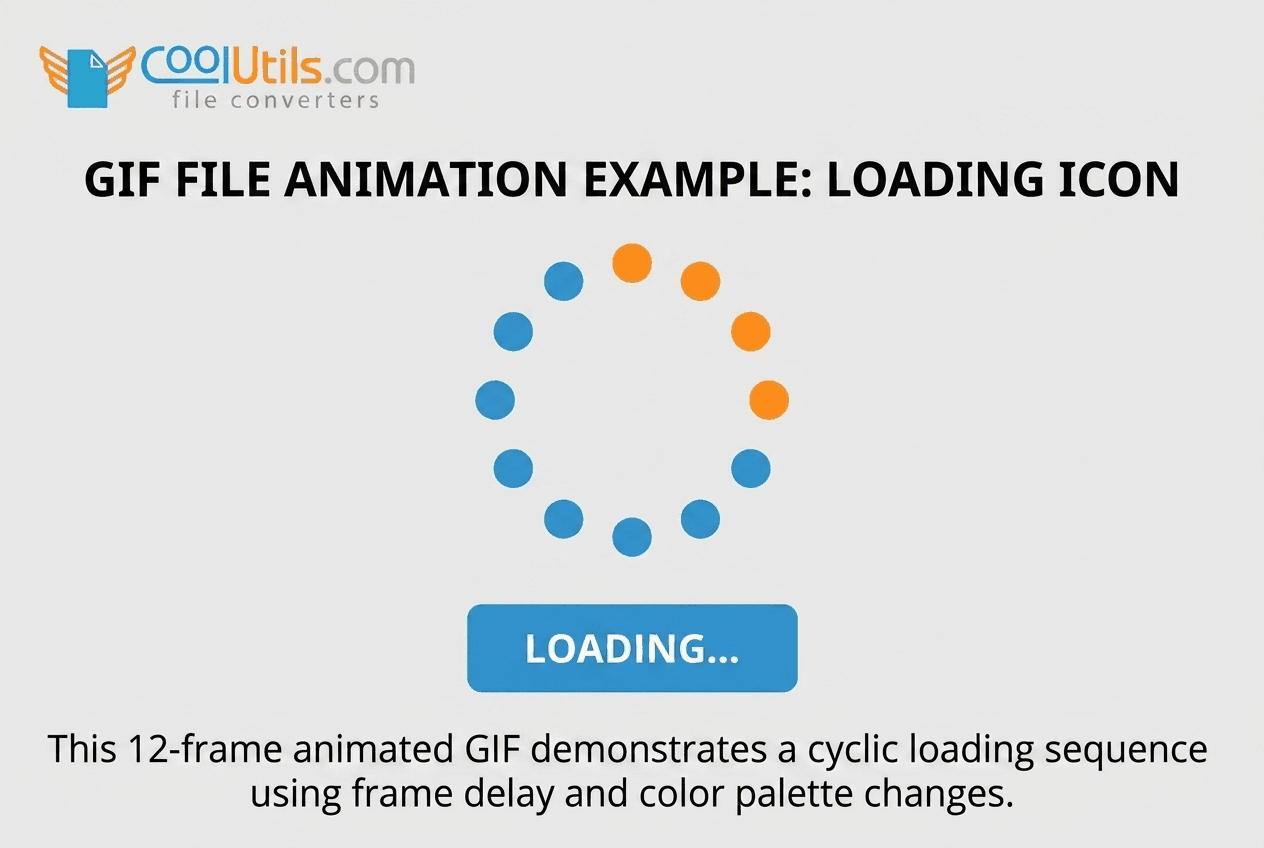
Web designers use GIF files for loading indicators, button states,
and lightweight UI animations where video overhead is unnecessary. A
looping spinner animation in GIF format typically occupies 15 to 50
kilobytes. GIF banners and animated headers load without codec
initialization delay, which suits environments with strict resource
budgets.
Email marketing relies on GIF animation to add motion to newsletter
headers and product showcases. HTML email clients, including Gmail and
Outlook on most versions, render GIF animation correctly. The same
clients reject embedded video in most configurations, so GIF remains the
practical standard for animated email content.
Social media and
communication
GIF files function as visual shorthand for emotional reactions in
digital messaging. Platforms including WhatsApp, Slack, iMessage, X
(formerly Twitter), and Discord include built-in GIF search powered by
Giphy and Tenor. Users send GIF reactions to convey humor, agreement,
surprise, and cultural references without typing.
Popular GIF categories and their communication functions:
-
Reaction GIFs convey emotional responses such as approval,
disbelief, and excitement in chat threads -
Instructional GIFs demonstrate simple software steps or physical
techniques in a compact looping format -
Brand GIFs present product features or campaign messages in a
short animated package -
Meme GIFs reference shared cultural moments and build recognition
within specific communities -
Product demonstration GIFs show interface interactions or
physical product attributes in real time
GIF vs. other file formats
GIF supports animation and near-universal compatibility, while PNG
offers superior color depth and full alpha transparency for static
images. Each format suits a different production context, and choosing
between them depends on the content type and the target platform.
GIF holds a unique position within image file formats because no
other widely adopted format combines animation, lossless compression,
and universal compatibility in a single container. APNG (Animated
Portable Network Graphics), created in 2004, adds animation to the PNG
structure with full 24-bit color and alpha transparency. Browser support
for APNG is broad as of 2023, but legacy application adoption remains
below GIF’s level.
Decision factors when choosing between GIF and alternative
formats:
-
Animation requirement: use GIF for simple silent loops; use MP4
or WebP for complex or long animations -
Color depth: use GIF when 256 colors are sufficient; use PNG or
WebP when full color matters -
Transparency type: use GIF for binary transparency; use PNG or
WebP for full alpha channel transparency -
Compatibility: use GIF when the target environment includes
legacy browsers or email clients -
File size: evaluate WebP animation for animated web graphics
where modern browser coverage is confirmed
GIF vs. video formats
GIF files differ from video formats in four ways: GIF plays without
audio, requires no codec, loops automatically without controls, and
embeds directly in HTML without a player wrapper. An MP4 file encoded
with H.264 at comparable visual quality produces a smaller file than GIF
for animations longer than approximately two seconds.
GIF suits short clips of two seconds or less where silent, autoplay
behavior is required. Video formats suit content longer than five
seconds, content requiring audio, or content where quality at small file
sizes matters. For clips between two and five seconds, the correct
format depends on the target platform’s codec support and audio
requirements.
Opening and viewing GIF
files
GIF files open natively in every major web browser and operating
system image viewer without additional software. Windows Photos, macOS
Preview, iOS Photos, and Android Gallery all recognize the .gif
extension by default. No codec installation or plugin is required for
basic animated playback.
Recommended software for opening GIF files by platform:
-
Windows: Windows Photos (built-in, supports animation playback),
any Chromium-based browser, IrfanView for frame-by-frame
inspection -
macOS: Preview (built-in, supports animation playback), Safari,
any major browser -
Mobile (iOS and Android): native gallery applications, any
browser application -
Professional editing: Adobe Photoshop (full frame-level control),
GIMP (free, open-source, full frame editing), ScreenToGif (Windows-only,
optimized for screen capture to GIF output)
Creating and editing GIF
files
GIF creation requires three inputs: source material (video clip or
image sequence), encoding software capable of GIF output, and an
understanding of the format’s color and compression constraints. The
source material type and encoder settings determine final file size and
visual quality more than any other factor.
Source material falls into two categories: video clips and static
image sequences. Video-to-GIF conversion is the most common workflow
because screen recordings and short clips translate naturally into
looping GIF format. Image sequence workflows suit frame-by-frame
animation produced in drawing applications or exported from presentation
tools.
Tools and software for GIF
creation
GIF creation tools by user level:
-
Beginner (browser-based): Giphy, Imgflip, and Ezgif accept video
uploads and produce GIF output with basic timing controls and no
software installation -
Intermediate (desktop, free): GIMP provides frame-level editing
and palette control; ScreenToGif captures screen activity and exports
directly to GIF with loop control -
Professional (desktop, paid): Adobe Photoshop supports
frame-by-frame creation with palette optimization settings; Adobe
Animate exports timeline animations as GIF -
Specialized conversion: FFmpeg converts video to GIF via command
line with full control over palette generation, frame rate, and canvas
dimensions
We use FFmpeg for batch GIF production in workflows that require
precise palette optimization, because FFmpeg’s two-pass palette
generation reduces file size by 30 to 50 percent compared to single-pass
encoder defaults.
Step-by-step GIF creation
guide
Step 1: Define the loop duration, canvas dimensions,
and intended platform before selecting any tool. Messaging GIFs target
under two seconds. Web UI animations target under one second for loading
indicators.
Step 2: Prepare the source material. Trim the video
clip or arrange the image sequence to include only the frames that will
appear in the final loop.
Step 3: Select software based on source type and
output quality requirements. Ezgif suits quick browser-based conversion.
GIMP and Photoshop provide professional palette control. FFmpeg handles
batch processing and scripted workflows via command line.
Step 4: Import the source material into the chosen
application and verify the frame sequence plays correctly.
Step 5: Set frame delay values. A delay of 100ms per
frame produces 10fps, which suits simple animations. A delay of 50ms per
frame produces 20fps, which suits smoother motion.
Step 6: Reduce the color palette to the minimum
count that preserves acceptable visual quality. A palette of 64 colors
often suffices for flat-color and cartoon-style source material.
Step 7: Preview the animation at full speed and
check the loop point for jarring frame transitions.
Step 8: Export the GIF with loop count set to 0 for
infinite looping and verify the output file size against the target
platform’s upload limit.
Optimizing GIFs for
performance
GIF file size depends on four variables: canvas dimensions, frame
count, color palette size, and the visual complexity of each frame.
Reducing any one of these variables decreases the output file size,
often without a proportional reduction in visual quality.
LZW compression produces the smallest output on frames with large
areas of uniform color. Dithering, which simulates additional colors by
alternating pixels from the 256-color palette, increases file size
because the resulting pixel noise compresses poorly under LZW. Disabling
dithering reduces file size at the cost of visible color banding in
gradient areas.
Optimization steps for smaller GIF output:
-
Reduce the palette to only the colors present in the source
image; many encoders default to 256 colors even when fewer exist in the
content -
Crop the canvas to the area of motion and layer the GIF over a
static background where the platform supports it -
Lower the frame rate to the minimum that preserves the motion
impression; 8fps often suffices for simple loops -
Remove duplicate or near-duplicate frames at the loop start and
end points -
Disable dithering for flat-color and cartoon-style source
material to improve LZW compression efficiency -
Apply local color tables per frame when frames contain distinct,
non-overlapping color sets
Balancing quality and file
size
GIF quality and file size pull in opposite directions. A
full-palette, high-frame-rate GIF may occupy several megabytes, which
slows page load and increases mobile bounce rate.
We find that reducing the palette from 256 to 64 colors cuts file
size by 30 to 50 percent for flat-color and cartoon-style animations,
with minimal visible impact. Photographic source material shows more
degradation at reduced palette sizes because the color loss affects
continuous tone areas. For photographic animated content, WebP animation
or MP4 produces better quality at lower file sizes than GIF at any
palette setting.
Frequently asked questions
Is it pronounced “gif” or
“jif”?
Steve Wilhite, the GIF format’s inventor, stated at the 2013 Webby
Awards that GIF is pronounced “JIF” with a soft G. Most English speakers
use a hard G and pronounce it to rhyme with “gift.” Merriam-Webster and
the Oxford English Dictionary list both pronunciations as correct
standard usage.
Can GIF files contain sound?
GIF files do not support audio. The GIF89a specification includes no
audio channel and no mechanism for synchronizing sound with frame
playback. For animated content requiring audio, MP4 with H.264 video and
AAC audio is the standard replacement format for web and messaging
contexts.
Are GIFs copyright protected?
GIF files fall under standard copyright law. The visual content
within a GIF file belongs to the original creator or rights holder,
regardless of the container format. Sharing GIFs that contain
copyrighted material without authorization may constitute infringement
under applicable national copyright legislation.
Why
do some GIFs look pixelated or show poor color quality?
GIF quality degrades when source material contains more than 256
colors. The encoder must reduce the palette, which introduces visible
banding and color shifts in gradients and photographs. Photographic
content converted to GIF at reduced palette sizes shows the most severe
quality loss.
What
is the future of GIF with newer animated formats available?
GIF retains widespread adoption due to universal platform support
across legacy and modern systems. APNG and WebP animated formats deliver
better quality at smaller file sizes but have not matched GIF’s
near-universal compatibility. Giphy, Tenor, and all major social
platforms continue to support GIF as a primary animated image format as
of 2025.
How large can a GIF file be?
The GIF89a specification sets a maximum canvas size of 65,535 ?
65,535 pixels but defines no maximum file size. Platform upload limits
apply in practice: Giphy accepts GIF files up to 100MB, X (Twitter)
accepts GIFs up to 15MB for standard accounts, and WhatsApp limits GIF
file size to 16MB.
Convert GIF files online
Free, no installation, no upload limits — convert right in your browser:

