Need help? Reach us at 

 +1 (855) 418-2323
Need help? Reach us at
+1 (855) 418-2323

 File Converters TIFF and PDF apps Forensic Freeware
Download Total Excel Converter and turn your XLS spreadsheets into SQL INSERT statements today.
(includes 30 day FREE trial)
(only $49.90)
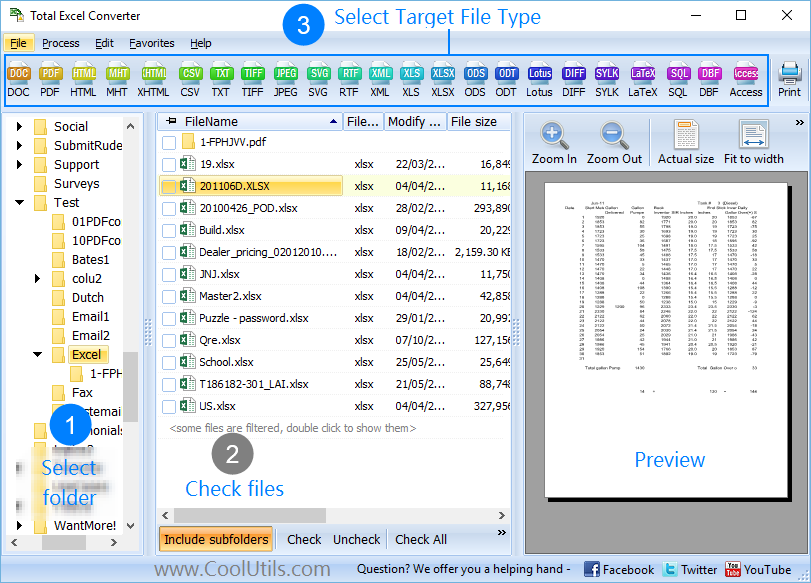
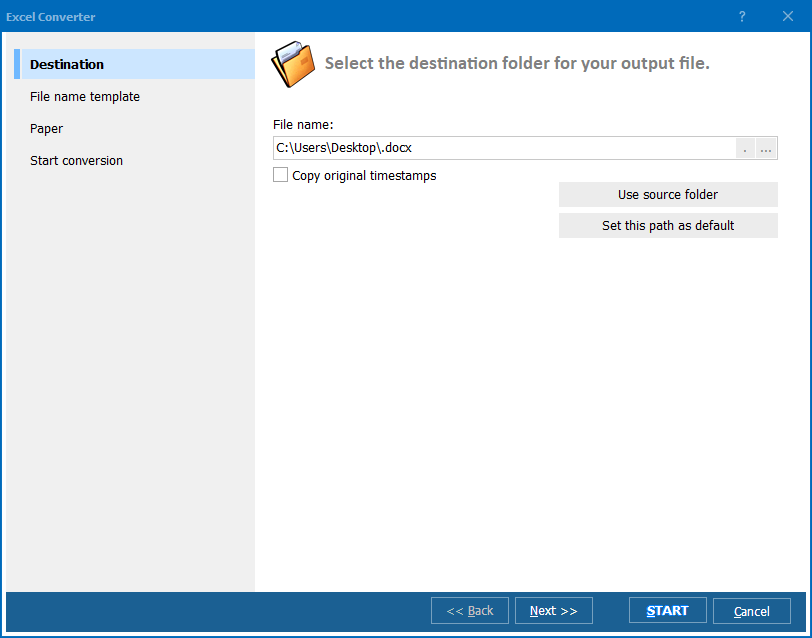
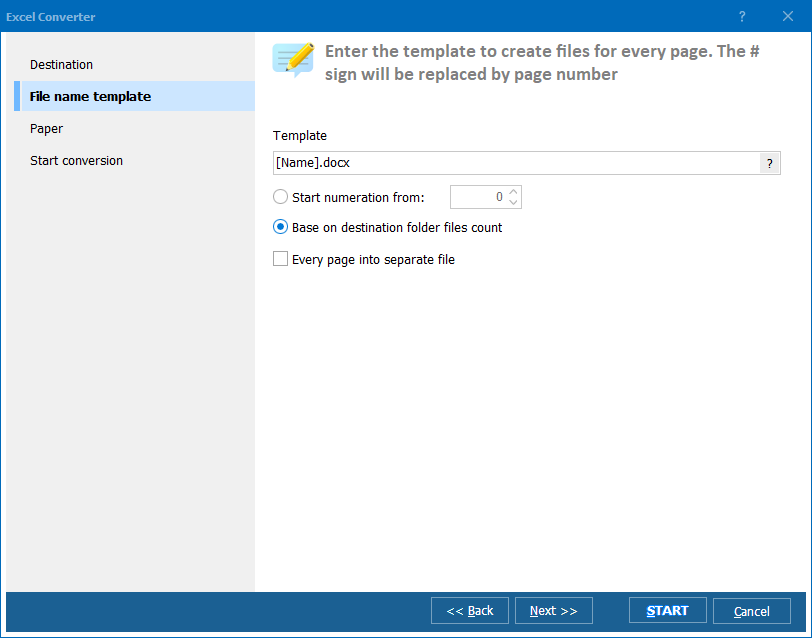
Quick answer: To convert XLS to SQL, launch Total Excel Converter, browse to the folder with your XLS files, check them (or use Check All), click the SQL button, set the destination folder and table or field options, then click Start. Each XLS file becomes a ready-to-import .sql dump with properly quoted INSERT statements, processed in one offline batch.
XLS is the binary spreadsheet format used by Microsoft Excel 97–2003. It stores data in worksheets with rows, columns, cell formatting, formulas, and charts. XLS files are designed for human editing in a spreadsheet application — not for direct import into a database engine.
SQL (Structured Query Language) dump files contain plain-text commands — typically CREATE TABLE and INSERT INTO statements — that a database server executes to recreate tables and populate them with data. SQL files are the standard way to move structured data between database systems, back up table contents, or seed a new database.
The gap between the two formats is straightforward: XLS is built for spreadsheets, SQL is built for databases. When you need to load spreadsheet data into MySQL, PostgreSQL, MariaDB, SQL Server, or SQLite, converting XLS to SQL gives you a ready-to-import file that preserves every row and column from the original spreadsheet.
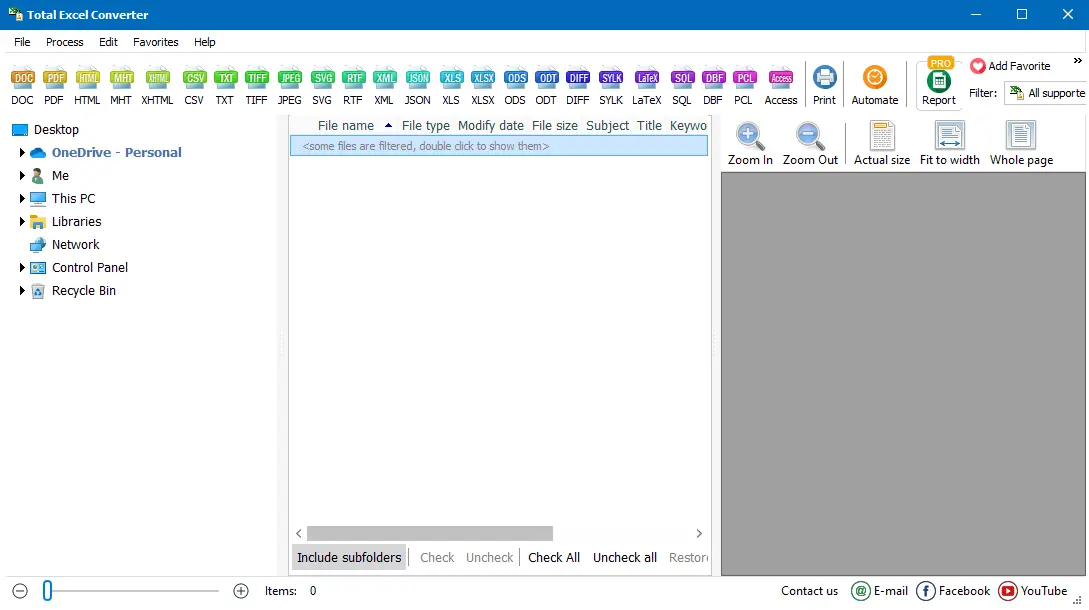
The entire batch completes in seconds, even for large file sets. Original XLS files remain unchanged.
Total Excel Converter includes a command-line interface for automated or scheduled conversion:
ExcelConverter.exe C:\Data\*.xls C:\Output\ -cSQL
This converts every XLS file in C:\Data\ to SQL and saves the results in C:\Output\. Additional flags control the output:
-FirstRowAsHeader — use the first row of each sheet as SQL column names-TableName MyTable — set a custom table name in the SQL output-Sheet 1 — convert only the first sheetSave the command in a .bat file and schedule it with Windows Task Scheduler to automate nightly data exports from Excel to your database.
 Batch processing. Select hundreds of XLS files and convert them to SQL in one run. Processing an entire folder takes roughly the same time as converting a single file.
Accurate data transfer. Cell values are correctly quoted and escaped in the SQL output. Numeric fields stay numeric, text fields are properly enclosed in quotes, and NULL values are handled. No data is lost or corrupted during conversion.
Column headers to field names. The converter reads the first row of each spreadsheet and uses those values as SQL column names. No manual mapping required — the table structure mirrors the spreadsheet layout.
Built-in file viewer. Preview any spreadsheet before conversion to verify that the source data and layout are correct. Catch problems before they reach your database.
No cloud upload. All processing happens on your PC. Financial data, customer records, and proprietary business information never leave your machine.
20+ output formats. Beyond SQL, convert XLS to XLSX, CSV, PDF, XML, JSON, HTML, DBF, LaTeX, and more — all in the same tool.
| Feature | Online Tools | Total Excel Converter |
|---|---|---|
| File size limit | 10–50 MB | No limit |
| Batch conversion | One file at a time | Unlimited files per batch |
| Data privacy | Files uploaded to third-party server | 100% offline |
| Speed | Depends on connection | Instant (local) |
| SQL customization | Minimal or none | Table names, field names, encoding, sheet selection |
| Automation | Manual only | Command line, .bat, Task Scheduler |
| Cost | Subscription | One-time $49.90 |

(includes 30 day FREE trial)
(only $49.90)
"We migrated a legacy inventory system that stored everything in Excel. Over 400 XLS files needed to go into MySQL. Total Excel Converter processed the entire batch in under two minutes. Column headers mapped to field names automatically, data types were correct, and the SQL imported without a single error. Saved me days of manual work."
 Kevin Marsh Database Administrator
"Clients send us product catalogs as XLS files every week. I set up a .bat script that runs Total Excel Converter on a schedule, converts the new files to SQL, and feeds them into our PostgreSQL database. The whole pipeline runs unattended. The command-line interface made integration straightforward."
Samantha Reeves Web Developer
"Good tool for getting spreadsheet data into a database without writing custom import scripts. I use it to convert monthly sales reports from regional offices — each report is a separate XLS file with multiple sheets. The converter handles multi-sheet files well and produces clean SQL. Would appreciate an option to customize the CREATE TABLE data types, but the defaults work for most cases."
 Martin Koller Data Analyst
Download free trial and convert your files in minutes.
No credit card or email required.

Related Topics
Convert XLSX to TIFF in Batch

