Logo
Home Products Support Contact About Us
arrow1 File Converters
arrow1 TIFF and PDF apps
arrow1 Forensic
arrow1 Freeware

PRN to CSV Converter — Extract Tabular Data from Print Spool Files


PRN files are raw print spool outputs — they contain text and printer instructions but cannot be opened in Excel or any spreadsheet application. If you need the tabular data locked inside a PRN file, converting it to CSV is the fastest way to get it into a usable format. Total PDF Converter reads PRN files and exports them to CSV, preserving row and column structure so you can open the result in Excel, Google Sheets, or import it directly into a database. Our PRN to CSV converter:
  • Converts PRN, PDF, EPS, and PS files to CSV, DOC, XLS, HTML, TIFF, TXT, and 15+ other formats
  • Processes hundreds of PRN files in a single batch — no manual steps per file
  • Lets you set a custom column separator (comma, semicolon, tab)
  • Works offline — files never leave your machine
  • Includes a command-line interface for scripted and scheduled conversion
  • Offers a 30-day free trial with full functionality

Download Total PDF Converter and start extracting data from PRN files today.


Download Now!

(includes 30 day FREE trial)

Buy License

(only $39.90)

PRN vs CSV: What Is the Difference?

PRN (Printer File) is a raw print spool format. When an application “prints to file,” Windows saves the output as a PRN file containing text, layout instructions, and printer control codes. PRN files are meant for printers, not for humans or spreadsheets. They cannot be opened in Excel, and the data inside is mixed with formatting commands that make it unreadable in a text editor.

CSV (Comma-Separated Values) is a plain-text tabular format. Each line represents a row, and values are separated by a delimiter (comma, semicolon, or tab). CSV files open in Excel, Google Sheets, LibreOffice Calc, databases, and any text editor. CSV is the universal exchange format for tabular data.

The key difference: PRN locks data inside printer instructions; CSV frees it into editable rows and columns. Converting PRN to CSV extracts the useful data and discards the printer overhead.

FeaturePRNCSV
PurposePrint spool outputTabular data exchange
ReadabilityPrinter codes mixed with textPlain text, human-readable
Opens in ExcelNoYes
Database importNoYes (direct import)
EditabilityNot editableFully editable
File sizeLarger (includes control codes)Smaller (data only)

How to Convert PRN to CSV

  • Step 1. Download and install Total PDF Converter. The setup takes under a minute.
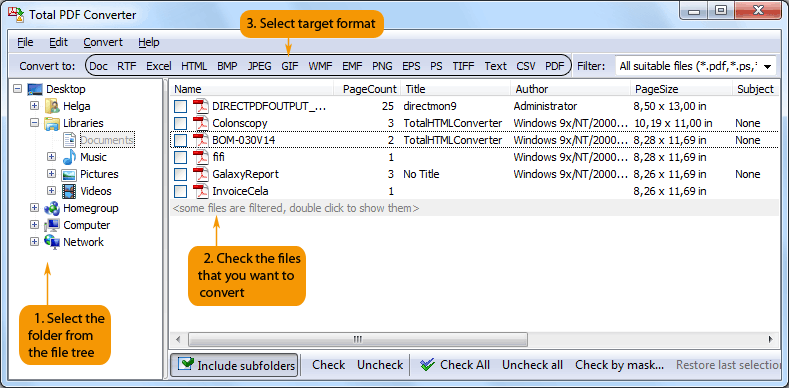
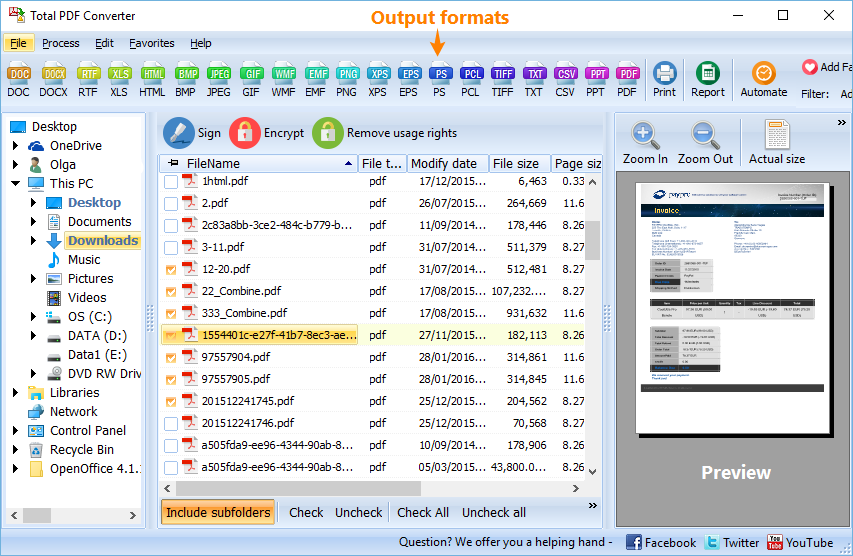
  • Step 2. Launch the converter. The left panel shows a folder tree; navigate to the folder containing your PRN files.
  • Step 3. Check the PRN files you want to convert. Use Check All to select every file in the folder for batch processing.
  • Step 4. Click CSV in the format toolbar at the top of the window.
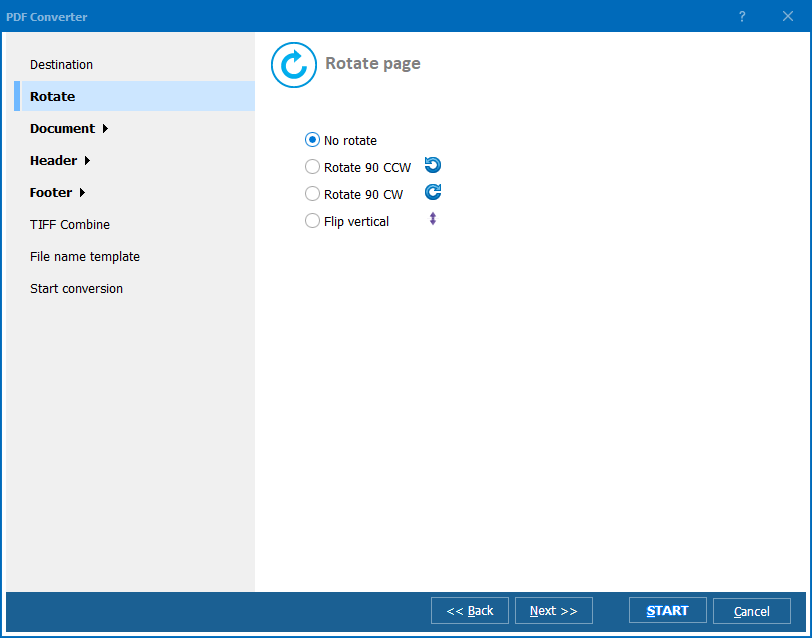
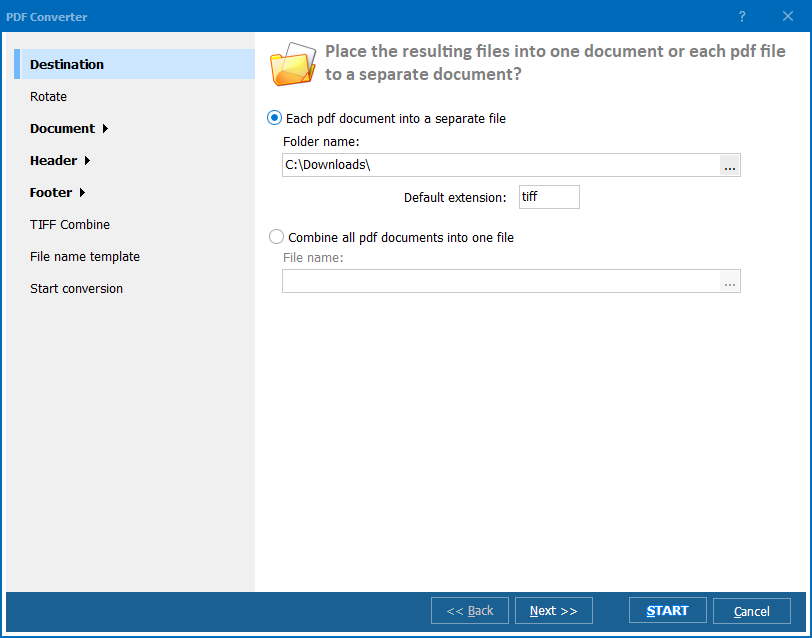
  • Step 5. In the conversion wizard, set the destination folder and CSV options: column separator (comma, semicolon, tab), encoding, and whether to include headers.
  • Step 6. Press Start. The converter processes all selected PRN files and saves CSV output to your chosen folder. Original files remain untouched.

Total PDF Converter - PRN to CSV conversion

Even large batches complete in seconds. Open the resulting CSV files in Excel or import them into your database immediately.

Command-Line Conversion

Total PDF Converter includes a command-line interface for scripted and automated workflows. Convert a single file:

PDFConverter.exe C:\Spool\report.prn C:\Output\report.csv -cCSV

Batch-convert an entire folder:

PDFConverter.exe C:\Spool\*.prn C:\Output\ -cCSV

Add this to a .bat file or Windows Task Scheduler to convert incoming PRN files automatically — useful for extracting data from legacy systems, ERP exports, and mainframe print jobs.

Why Use Total PDF Converter?

Batch processing

Select hundreds of PRN files and convert them all to CSV in one run. Legacy systems often produce daily PRN exports — batch conversion handles the entire queue without manual work.

Accurate data extraction

The converter parses PRN printer commands and extracts the underlying text data. Columns align correctly in the resulting CSV, so you do not need to clean up formatting artifacts in Excel.

Flexible CSV options

Choose comma, semicolon, or tab as the column separator. Set the output encoding (UTF-8, ANSI, etc.) to match your database or spreadsheet requirements.

15+ output formats

Besides CSV, convert PRN files to DOC, XLS, HTML, PDF, TIFF, JPEG, TXT, RTF, and more. One tool handles every format you need for archiving, reporting, or data migration.

No special software required

Total PDF Converter reads PRN files with its own parser. No printer drivers, no Adobe software, and no Microsoft Office installation needed.

Works offline

All processing happens on your PC. Financial data, internal reports, and business-critical spool files never leave your machine. No internet connection required.

Online Converters vs Desktop Converter

FeatureOnline ToolsTotal PDF Converter
PRN supportRarely availableFull support
File size limit10–100 MBNo limit
Batch conversionLimited or paidUnlimited
PrivacyFiles uploaded to cloud100% offline
CSV separator optionsFixed (usually comma)Comma, semicolon, or tab
SpeedDepends on connectionInstant (local)
AutomationManual or paid APIBuilt-in command line
PricingSubscriptionOne-time $39.90

download PRN to CSV converter

Windows 7/8/10/11 • 30-day free trial

When Do You Need PRN to CSV Conversion?

There are several scenarios where converting PRN to CSV is the right solution:
  1. Legacy system data extraction. Mainframes and older ERP systems print reports to PRN files. Converting them to CSV lets you import the data into modern spreadsheets and databases.
  2. Accounting and finance. Financial reports exported as PRN spool files contain transaction data that accountants need in Excel. CSV conversion makes it available for pivot tables, formulas, and analysis.
  3. Data migration. Moving data from a legacy application to a new system often starts with PRN exports. CSV is the universal import format accepted by nearly every database and business application.
  4. Automated report processing. A scheduled task converts daily PRN outputs to CSV, then a script imports the data into a dashboard or reporting tool — zero manual handling.
  5. Archiving in a usable format. PRN files are tied to specific printer drivers and may become unreadable over time. CSV preserves the data in a format that will remain accessible for decades.


Download Now!

(includes 30 day FREE trial)

Buy License

(only $39.90)


quote

Total PDF Converter Customer Reviews 2026

Rate It
Rated 4.7/5 based on customer reviews
5 Star

"Our ERP system dumps daily reports as PRN files. Total PDF Converter turns them into clean CSV that imports straight into SQL Server. Saved us from writing a custom parser."

5 Star Richard Olsen Database Administrator

"I get hundreds of PRN print spool files from a legacy accounting system every month. Batch conversion to CSV takes seconds, and the column alignment in Excel is spot on. Great tool."

5 Star Laura Mendez Financial Analyst

"Simple and reliable. The command-line mode lets me schedule nightly PRN-to-CSV conversion via Task Scheduler. No babysitting required."

4 Star Thomas Eriksson IT Support Specialist

FAQ ▼

Yes. Total PDF Converter supports batch conversion. Select an entire folder of PRN files and convert them all to CSV in a single run. There is no file count limit.
You can choose comma, semicolon, or tab as the delimiter. Set it in the conversion wizard before starting. The default is comma.
Yes. The converter parses printer commands inside the PRN file and extracts text data while preserving row and column alignment. The resulting CSV opens correctly in Excel and other spreadsheet applications.
Yes. Run PDFConverter.exe with source, destination, and the -cCSV flag. Example: PDFConverter.exe C:\Spool\report.prn C:\Output\report.csv -cCSV. You can use wildcards to batch-convert entire folders.
No. Total PDF Converter reads PRN files with its own parser. No printer drivers, no Adobe software, and no Microsoft Office installation is required.
Besides CSV, you can convert PRN to DOC, XLS, HTML, PDF, TIFF, JPEG, TXT, RTF, PNG, BMP, and more than 15 other formats using the same converter.
A personal license costs $39.90 as a one-time payment with free updates for one year. A 30-day free trial is available with no credit card or email required.


Start working now!

Download free trial and convert your files in minutes.
No credit card or email required.

⬇ Download Free Trial Windows 7/8/10/11 • 95 MB

Support
PDF Converter Preview1
PDF Converter Preview2
PDF Converter Preview3

Latest News

Newsletter Subscribe

No worries, we don't spam.


© 2026. All rights reserved. CoolUtils File Converters

Cards