Logo
Home Products Support Contact About Us
arrow1 File Converters
arrow1 TIFF and PDF apps
arrow1 Forensic
arrow1 Freeware

How to Convert PRN to TXT?


PRN is a file format that is very easy to come around. All you need to do to get a PRN document is send files to print within the Print dialog box. Evidently, a PRN file will contain not only the contents you are about to print out, but also special instructions for the printer. That's why PRN files are very difficult to open with regular text-processing software.

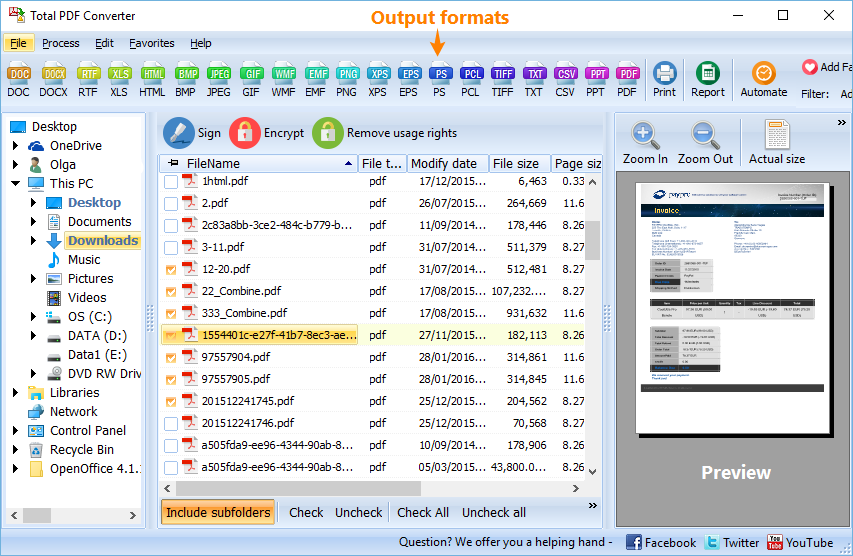
Quick answer: To convert PRN to TXT, install Total PDF Converter, open the folder with your PRN files, tick the ones you want, click the TXT button to set the output format, then press Start. The whole batch converts in a few clicks, runs offline on your PC, and the free 30-day trial is fully functional.

To be able to view PRN files in Notepad or Wordpad, you will need to convert PRN files to a text (TXT) format since PRN documents as is can only be opened in ACD Systems Canvas 12, Microsoft Office Document Imaging, AllWeb FastPrint, Microsoft Windows Command Prompt, and Free Raw Print (FRP).

Have you never before faced a task of converting PRN to TXT and whish to know how to convert PRN to TXT? Here's the simple answer: download a proper converter. One of the programs you are recommended to try is Total PDF Converter. Having been designed by CoolUtils, a software development company with a more than 10-year experience, this tool is perfectly suited to process documents saved in PRN, PDF, EPS and PS formats. Among the supported target formats are: TXT, HTML, DOC, XLS, CSV, PDF, TIFF, JPEG and others.

The program is one of the few PRN text converters available online that combines extended functionality with user-friendly interface. All you have to do to get your PRN documents converted into TXT, is:

  • Download Total PDF Converter here. You are more than welcome to choose between the free 30-day trial version of the program or its fully functional paid version offered for just under $50.
  • Install the program and launch it as usual. Built-in wizard will guide you through the installation process; the program can be launched from the desktop or from within the command line.

  • Select files for conversion and set target format. Just tick off the PRN files you want to process and click on the TXT button to set it as the output format.
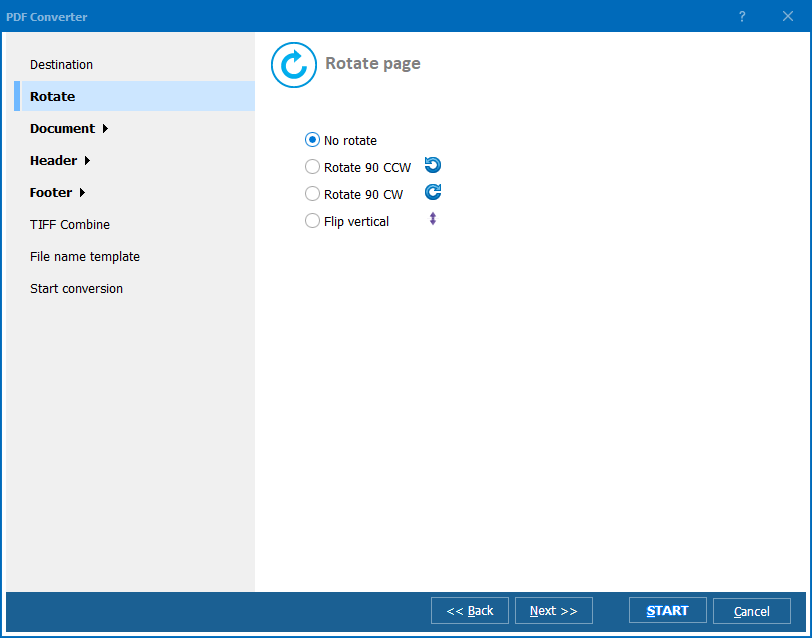
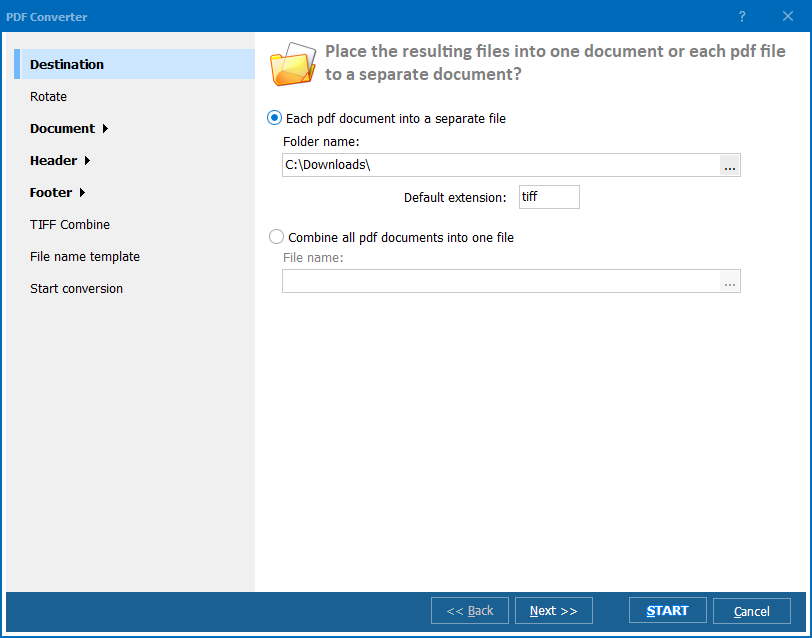
  • Click the Start! button to begin conversion. You can proceed with the default settings or change them according to your preferences.
  • Enjoy 100% automatic PRN to TXT conversion!

quote

Total PDF Converter Customer Reviews 2026

Rate It
Rated 4.7/5 based on customer reviews
5 Star

"A legacy invoicing system only outputs PRN files, and none of our staff could read them in Notepad or Wordpad. Total PDF Converter ticked off the whole folder and turned every PRN into plain TXT in one batch run. Now our bookkeepers can search old invoices with a normal text editor."

5 Star Rebecca Hsu Office Manager, Hsu & Partners Accounting

"Part of a client migration involved pulling text out of hundreds of PRN print spool files buried in an old file share. Batch converting them to TXT with Total PDF Converter took a few clicks instead of opening each file in a specialized viewer. The command-line option let me fold the whole job into our migration script."

5 Star Victor Ionescu Data Migration Specialist, Ionescu Consulting

"Our shipping software prints labels as PRN files by default, and I needed the raw text for a records request. Total PDF Converter extracted plain text from the whole batch in one pass, ready to open in Wordpad. It would help to have an option to strip extra printer control characters that sometimes show up in the output."

4 Star Angela Petrov Administrative Assistant, Petrov Logistics

PRN to TXT — FAQ ▼

How do I convert PRN to TXT?

Install Total PDF Converter, open the folder with your PRN files, tick the ones you want, click the TXT button, then press Start. The program strips the printer instructions and saves clean plain-text files you can open in Notepad or Wordpad.

Why cannot I open a PRN file in Notepad directly?

A PRN file holds both the page contents and special instructions for the printer, so regular text editors show garbled data. Total PDF Converter extracts only the readable text and writes it to a proper TXT file.

Can I convert PRN to TXT in batch?

Yes. Total PDF Converter lets you tick many PRN files at once and convert the whole batch in a single run, instead of processing them one at a time.

Is converting PRN to TXT free?

Total PDF Converter offers a fully functional 30-day free trial with no credit card or email required. A personal license starts at just under $50 after the trial.

Can I convert PRN to TXT from the command line?

Yes. Total PDF Converter includes a command-line version, so you can run PRN to TXT conversions in .bat scripts or scheduled tasks without opening the interface.

What other formats can Total PDF Converter export PRN to?

Besides TXT, Total PDF Converter exports PRN files to HTML, DOC, XLS, CSV, PDF, TIFF, JPEG, and other formats, all from the same program.


Start working now!

Download free trial and convert your files in minutes.
No credit card or email required.

⬇ Download Free Trial Windows 7/8/10/11 • 94 MB

Friday Sale
PDF Converter Preview1
PDF Converter Preview2
PDF Converter Preview3

Latest News

Newsletter Subscribe

No worries, we don't spam.


© 2026. All rights reserved. CoolUtils File Converters

Cards